
To find an old voice note, search its transcript rather than scrolling through recordings. If you don't remember the exact words, you need search that matches meaning: you type "pricing" and it finds the note where you talked about "what we charge." Nuro does that, and can also answer a question across several notes at once.
Here's the problem in practice. Three weeks ago you talked through a decision on a walk. Today you need it. You remember roughly what you decided, but not when, not what you called it, and definitely not the words you used.
Step 1: get transcripts
You can't search audio, only words. So the first thing is making sure your recordings have transcripts.
- Apple Voice Memos shows a transcript of a recording on supported iPhones running iOS 18 or later. Open the recording and look for the transcript button.
- Apple Notes can record audio inside a note and show a transcript on supported iPhones, which keeps the recording next to anything else you wrote.
- Nuro transcribes every entry automatically, and keeps the transcript with the recording.
If your recordings are older than your current setup, they may not have transcripts at all. That's worth knowing before you spend twenty minutes searching for words that were never written down.
Step 2: search by meaning, not just words
Word search is literal. If you said "the money part" and search for "pricing," you get nothing.
Search by meaning compares what your search is about with what each note is about. Nuro shows two groups: entries that contain your words, and entries labelled Close in meaning, so you can tell why something showed up.
A few tips that work for any search:
- Search for the decision, not the topic. "Did I decide to move the launch" beats "launch."
- Use the people. Names are the words you're most likely to have actually said.
- Narrow by time. If you know it was "around when I was sick," filter to that month.
Step 3: ask instead of reading
Sometimes you don't want the note. You want the answer in it.
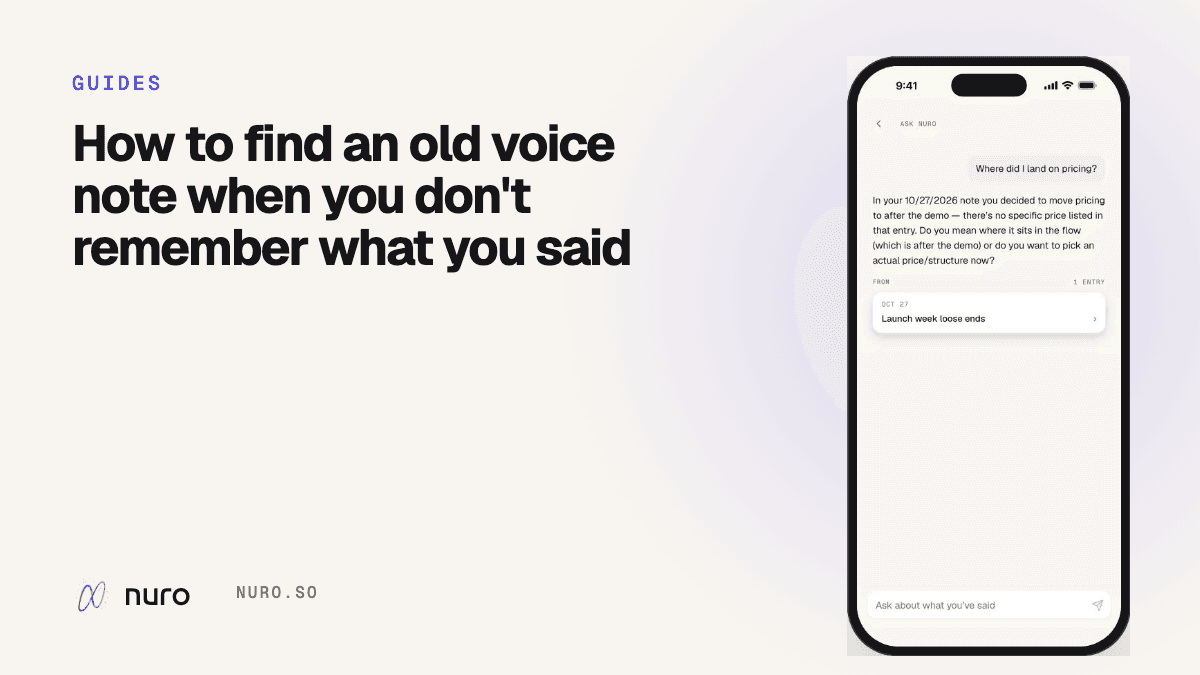
In Nuro, every search has an Ask Nuro row at the top. Tap it and Nuro reads the matching entries and answers in a sentence or two, with the entries it used listed underneath. Questions that work well:
- "What did I decide about the launch date?"
- "What was the book Sam recommended?"
- "What have I said about my knee since September?"
AI answers can be wrong or incomplete, so treat the answer as a pointer. The linked entries are the source; open them when it matters.
Step 4: make future you's life easier
The easiest search is the one you set up when you record:
- Say the key word out loud. "Okay, pricing decision:" at the start of a recording costs two seconds.
- Say the date when it matters. "For the trip on the 14th…" Nuro picks up dates you say, and to-dos with a day you named remind you on that day.
- One thought or many, both are fine. Nuro splits a mixed recording into its separate parts, so a ramble is still findable.
Frequently asked questions
Can you search Voice Memos on iPhone by what was said?
On iOS 18 and later, Voice Memos can show transcripts on supported iPhones, which makes the words searchable. It matches words, not meaning.
What is semantic search?
Search that matches meaning rather than exact words. It finds "what we charge" when you search for "pricing." Nuro uses it for every entry.
Can I ask my journal a question?
In Nuro, yes. Ask Nuro answers from your own entries and shows which ones it read. More on the search and Ask Nuro page.
What if I can't find it at all?
Check whether the recording ever had a transcript, and whether it saved. Nuro shows when an entry's audio didn't finish uploading, and the words it heard are still searchable.